Sergen Tanguc
Publication: APR 2026 Reading time: 9 min

Killing 1Password Biometric Spam in Claude Code with One Pipe

#claude-code #devops #security

Killing 1Password Biometric Spam in Claude Code with One Pipe

Environment

ComponentVersion
Claude Code2.1.x (Opus 4.6, 1M context)
1Password CLI (op)2.33.1
jq1.7+
yq (Mike Farah)4.x
macOS15.7.x (Sequoia) with Touch ID

The problem

I run Claude Code in agent mode all day for infra work. Most of it needs secrets out of 1Password — Proxmox passwords, Cloudflare API tokens, iDRAC creds, OpenTofu service tokens. The natural way to fetch them is op item get, which triggers an authorization prompt every time you don’t have a live session.

Run that once: prompt. Run it again 30 seconds later if the first call’s session lapsed: prompt. Inside an agent loop that needs five secrets: five separate interruptions. If I’m not looking at the screen when the prompt fires, the loop stalls until I notice. On a long reasoning run with Opus — where the model sits thinking for two or three minutes between tool calls — this happens constantly.

The two auth modes, and why both have the same problem

On macOS, the 1Password CLI offers two ways to authorize:

  • Touch ID prompt — fast biometric, fires in a native dialog you have to focus
  • Desktop CLI authorization dialog — enabled via Settings → Developer → Integrate with 1Password CLI, routes the prompt through the 1Password app itself with a per-terminal approval flow

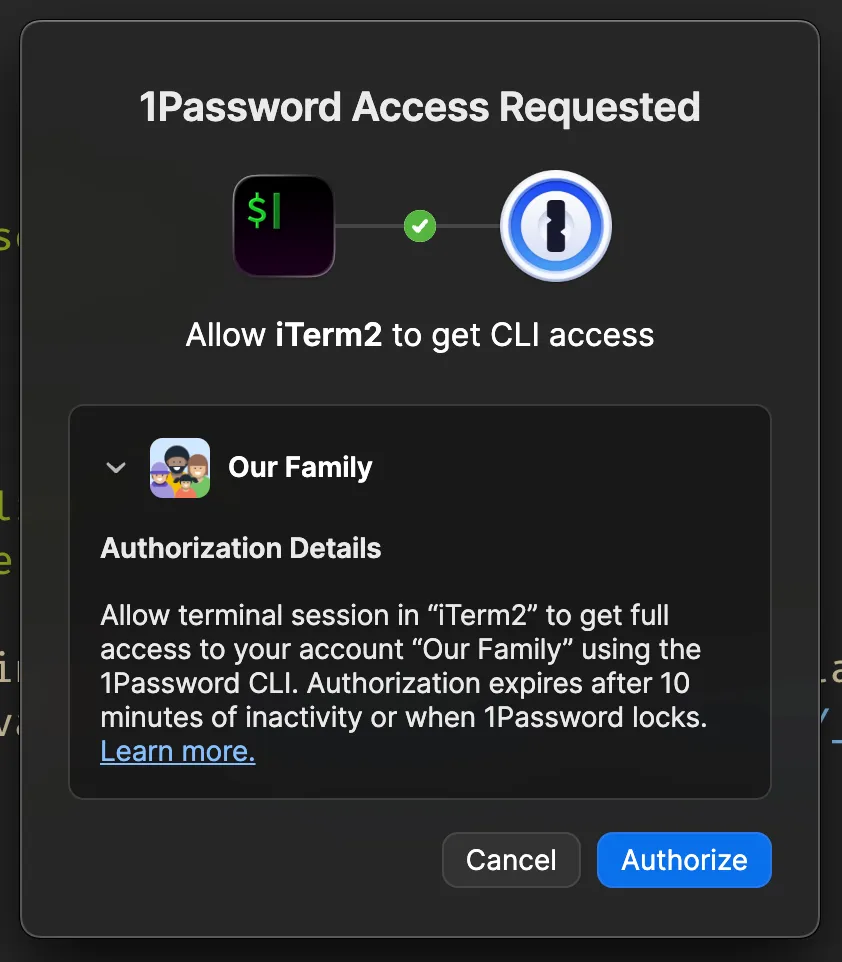
1Password CLI authorization dialog

The dialog text is explicit: “Authorization expires after 10 minutes of inactivity or when 1Password locks.”

That 10-minute idle timeout is the crux. In an active Claude Code session, spending a couple of minutes reviewing model output between tool calls is normal — especially on multi-step reasoning tasks. Both auth modes share this limit. Five minutes after your last op call, the next one re-prompts. It doesn’t matter which mode you use. The session isn’t kept warm by thinking, only by calling op.

The cache approach described below is unaffected. The secrets live in a JSON file in /tmp/tmp doesn’t have an idle timeout.

The naive cache I had been running

Before this, I had infra-secret.sh — a script that called op item get once per key, wrote the result to a per-key temp file, and returned from cache on subsequent calls:

Terminal window
# simplified version of what I had
CACHE_DIR="/tmp/.claude-infra-secrets-$(id -u)"
mkdir -p "$CACHE_DIR" && chmod 700 "$CACHE_DIR"
CACHE_FILE="$CACHE_DIR/$KEY"
if [ -f "$CACHE_FILE" ]; then
cat "$CACHE_FILE"
exit 0
fi
op item get "$ITEM" --fields "label=$FIELD" --reveal > "$CACHE_FILE"
chmod 600 "$CACHE_FILE"
cat "$CACHE_FILE"

This worked for a fixed set of known keys. The problem: only kicks in after the first call per key, so adding a new secret means accepting a fresh prompt the first time it runs. It also doesn’t solve the case where an agent task needs a secret I hadn’t pre-declared. Six items in a workflow: six separate prompts on first use, then cached for the rest of the session.

The wish was simpler: one prompt per vault per session, all secrets available from that point on.

The trick: one pipe, one prompt

This is buried in the op docs but easy to miss because every documented example layers on --fields which, as I’ll show, blows everything up.

Terminal window
op item list --vault Infrastructure --format=json \
| op item get - --format=json

op item list enumerates item IDs. Piping to op item get - makes the second op call fetch all of them in one invocation, sharing the auth session. Two op processes, one prompt.

My first attempt added --fields label=password to extract only passwords:

Terminal window
op item list --vault Infrastructure --format=json \
| op item get - --fields label=password --format=json

It blew up:

[ERROR] unable to process element 1: "password" isn't a field in the "monitoring-vm age private key (SOPS)" item

Worse: the error aborts the entire stream. Items processed before the error were lost on re-run because op item list ordering is non-deterministic — sometimes the bad item was at position 5 and four items printed before the abort, sometimes it was at position 1 and nothing came out. Non-deterministic partial output with no recovery path.

Then I dropped --fields entirely:

Terminal window
op item list --vault Infrastructure --format=json \
| op item get - --format=json

18/18 items returned, zero errors, one prompt, full JSON for every item — passwords, usernames, custom fields, sections, the lot. Concealed values returned unredacted. Total time: ~9 seconds for 18 items.

That’s the trick. Without --fields, op doesn’t gate items on field presence — it dumps each item’s full shape and moves on. The flag I had never thought to remove was the entire problem.

Verifying it is byte-faithful

Spot-checked three items (Telegram bot token, Cloudflare API token, Umami Postgres password) against individual op item get calls. Identical down to the byte.

One edge case worth knowing: items with custom fields defined but never filled in return empty values from the bulk fetch — not because of bulk mode, but because that’s the actual state of the item. The 1Password GUI hides empty fields in view mode but they exist in the item structure. I found two ghost fields on my Umami item this way and cleaned them up.

Wrapping it as a cache with auto-refresh on miss

The cache layer is straightforward:

  • op-bulk-load.sh runs the pipe, dumps the JSON output into /tmp/.op-toolkit-$(id -u)/<vault>.json
  • op-cache-get.sh does a jq lookup against the file using 1Password’s op://Vault/Item/field URI scheme
  • Directory is chmod 700, files are chmod 600 — plaintext JSON in /tmp, user-only perms

The first version errored on cache miss. That was wrong. The most common cause of a cache miss is “I added an item to 1Password since the cache was warmed.” So op-cache-get.sh now checks the cache file’s mtime on miss. If it’s older than 30 seconds, it auto-refreshes that vault and retries the lookup. The 30-second debounce stops typos from infinite-looping — back-to-back misses on a freshly-refreshed cache short-circuit to a clear error message.

Terminal window
op-cache-get.sh 'op://Infrastructure/SomeNewItem/password'
# miss → cache age 47s ≥ 30s → refresh → re-lookup → return value

Override the debounce with OP_TOOLKIT_REFRESH_DEBOUNCE=60. Disable auto-refresh entirely with --no-refresh.

The numbers

OperationBeforeAfter
First secret of session~2s + 1 prompt~9s + 1 prompt (full vault loaded)
Each subsequent unique secret~2s + 1 prompt72ms, zero prompts
5 secrets in a workflow5 prompts, ~10s, interruptions1 prompt, ~9s, all prefetched
Adding a 6th secret1 fresh promptzero prompts (already in cache)
Effect of 10-minute idle timeoutnext call re-promptsirrelevant, cache outlives idle

The biometric prompt cost is now constant — exactly one per vault per session — independent of how many secrets the agent ends up needing.

Init flow

Terminal window
op-toolkit-init.sh
# lists your 1Password vaults, asks which ones to cache
# writes ~/.config/op-toolkit/config.env

After that, scripts work without arguments — they pick up the configured vault list automatically. No alias setup required. References use 1Password’s own URI scheme:

Terminal window
PASS=$(op-cache-get.sh 'op://Infrastructure/Proxmox - Main/password')

Aliases are an optional convenience layer on top, not a setup requirement.

Creating items from YAML templates

The other half of the toolkit. The hard part of “use 1Password well” isn’t reading secrets — it’s creating them with consistent metadata so future-you (or future-Claude) can understand what an entry is for six months later.

A login.yaml example:

title: "Cloudflare API Token - OpenTofu IaC"
category: api-credential
vault: Infrastructure
url: https://dash.cloudflare.com/profile/api-tokens
username: stanguc@personal
password: <paste-token-here>
sections:
Permissions:
scope: "Account: All zones, DNS: Edit"
role: limited
IP restrictions: none
Issued:
created: 2026-04-12
expires: never
notes: |
Purpose: OpenTofu Cloudflare provider for personal infra IaC
Rotation: every 90 days
Related: stanguc/sergen-infra-home repo
Where used: ~/.claude/scripts/load-infra-secrets.sh exports as $CF_API_TOKEN

Then:

Terminal window
op-item-new.sh login.yaml
# created: op://Infrastructure/Cloudflare API Token - OpenTofu IaC/password
# cache refreshed

The script enforces conventions by construction:

  • title must be ≥ 10 chars (no test, no foo)
  • category must be from a known list (login, api-credential, server, secure-note)
  • notes are mandatory prose, not optional
  • soft warning if notes don’t mention purpose, rotation, or related resources
  • sections become op’s "Section.field[type]=value" syntax
  • field types are auto-detected: anything with password, token, secret, or key in the name becomes concealed; everything else is text

--dry-run prints the full op item create command without running it. After creation, the script refreshes the vault cache so the new item is immediately readable via op-cache-get.sh — no manual warm-up needed.

Packaging it as a Claude Code plugin

Claude Code 2.x has a real plugin system. The layout:

plugins/op-toolkit/
├── .claude-plugin/plugin.json # plugin manifest
├── README.md
├── bin/ # auto-added to PATH on install
│ ├── op-toolkit-init.sh
│ ├── op-bulk-load.sh
│ ├── op-cache-get.sh
│ ├── op-cache-clear.sh
│ └── op-item-new.sh
├── templates/ # YAML examples for op-item-new.sh
│ ├── login.yaml
│ ├── server.yaml
│ ├── api-credential.yaml
│ └── secure-note.yaml
└── skills/op-toolkit/
└── SKILL.md # behavioral doc Claude reads

The bin/ directory is the key: anything there becomes available on PATH while the plugin is enabled, no path prefixes needed in prompts or hook scripts.

Validation is built into the CLI:

Terminal window
$ claude plugin validate ./claude-marketplace
Validation passed

Local testing without publishing:

Terminal window
$ claude --plugin-dir ./claude-marketplace/plugins/op-toolkit

Install

/plugin marketplace add tanguc/claude-marketplace
/plugin install op-toolkit@tanguc

Source: github.com/tanguc/claude-marketplace. MIT license.

Requires op 2.x, jq, and yq (brew install yq).

Limitations worth knowing

  • Document category items — return metadata only. File content needs op document get. Not handled by this toolkit.
  • File attachments on regular items — metadata only, not downloaded.
  • TOTP fields — return the OTP URI, not the live 6-digit code.
  • Item titles containing / — break the op://Vault/Item/field URI parser. This is a 1Password CLI limitation, not specific to this toolkit.
  • Plaintext cache — JSON file in /tmp, user-only permissions but plaintext. If that’s unacceptable for your threat model, do not use this.

Why this took embarrassingly long to find

The op item list | op item get - pattern is in the official op docs. I had read those docs more than once and never tried it because every documented example used --fields, and --fields blows up the stream on any item that doesn’t have that field. The fix was removing the flag I had never thought to question, because every example included it.

The lesson is not new but it bears repeating: when a pipeline aborts on the first invalid element, the answer is rarely “skip the bad elements” and almost always “ask for less specific output.” The CLI has no --ignore-errors flag for --fields, and it doesn’t need one — it already has a mode that returns everything without gatekeeping on field presence. I was just not using it.

One pipe. One prompt. Done.